Key takeaways
- A missing alt attribute makes screen readers announce the filename, while an empty alt="" correctly tells them to skip decorative images.
- Crawlers like Screaming Frog only see rendered pages, so cross-check the WordPress media library to catch unused attachments with no alt text.
- An Excel audit with LEN and COUNTIF formulas ranks images by page traffic and prominence, so you fix the highest-risk images first.
- Bulk-fix safely by storing generated alt text as a proposal, previewing before apply, and never overwriting original values without a rollback list.
- Prevent recurrence by enforcing alt text at upload and running a monthly checker on maintained client sites.
Missing alt text means images on a site have no text alternative, so screen reader users get nothing and search engines lose context. This guide shows you how to run a site-wide check, audit the results in a copy-paste Excel template, and rank which images to fix first, so you repair the 20% of images carrying 80% of the risk without bulk-generating alt for a neglected media library all at once.
What is the missing alt text meaning and why does it matter?
Missing alt text means an <img> tag with no alt attribute at all, or one whose alt attribute is empty when the image carries real information. The distinction matters because screen readers handle each case differently.
What screen readers announce when alt text is missing
When the alt attribute is absent, a screen reader falls back to announcing the filename, so a client's hero image becomes "hero-final-v2-JPEG.jpg". That is noise for a blind visitor and a wasted relevance signal for search engines. Images missing alt text also fail WCAG checks that clients increasingly ask about at handover.
When an empty alt attribute is actually correct
An empty alt="" is the right choice for purely decorative images, because it tells screen readers to skip them. The W3C WAI images tutorial draws the line between decorative and informative images. Our guide to ALT text generation covers how bulk ALT tools handle that distinction.
How do images missing alt text hurt accessibility and SEO?
WCAG and the alt attribute requirement
WCAG 2.1 success criterion 1.1.1 requires a text alternative for every non-text element, and the alt attribute is how you provide it for images. Screen readers skip images with no alt text entirely, or worse, announce the filename, which tells a visitor nothing. For a client site in a regulated field, that is a lawsuit risk as well as a usability failure.
How search engines read images without alt text
Google indexes images through their text alternatives, so an image missing alt text cannot rank in image search and contributes nothing contextually to the page. Alt text is one of the few image signals you fully control. Fixing a backlog of missing alt text on an existing library is the fastest win, and if a client asks who maintains the plugin doing the fixing, point them to https://foldrocket.com/support/.
How do you run a missing alt text checker across an entire site?
Free options: browser extensions and crawlers
Two free routes cover most audits. Browser extensions like WAVE or axe DevTools flag images missing alt text as you browse, which works for spot-checking a homepage but not a 4,000-image library. For a full sweep, run Screaming Frog against the site's XML sitemap and filter the images report for empty alt attributes. WCAG 2.x success criterion 1.1.1 Non-text Content requires a text alternative for every image, so the crawler output maps directly to the fix list.
Checking the WordPress media library itself
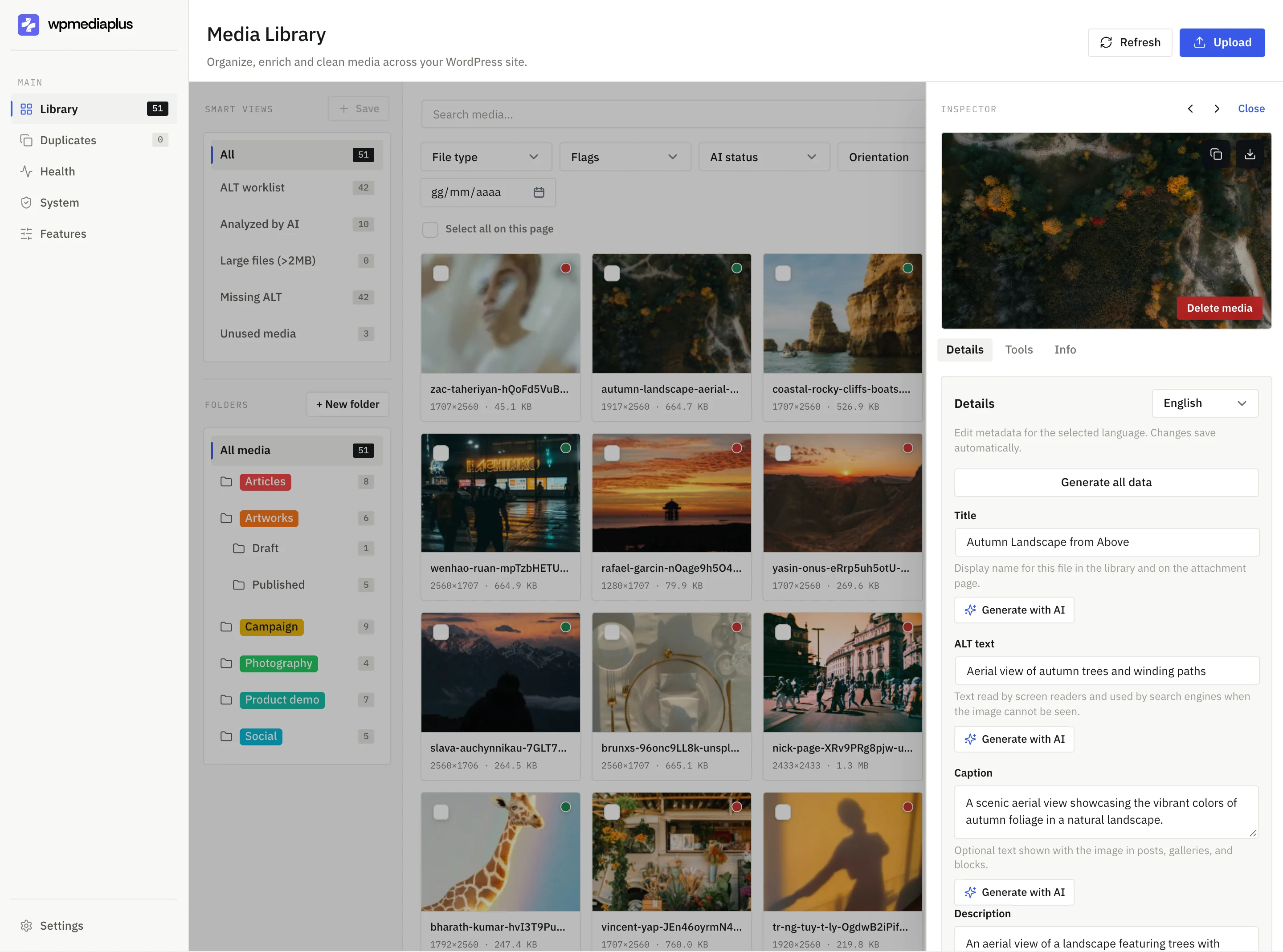
Crawlers only see images rendered on live pages. Featured images, unused media, and attachments never crawled stay invisible, so cross-check the media library itself. FoldRocket scans ALT text across the whole library, shows a preview before apply, and writes nothing destructively. Its image optimizer comparison covers how it sits alongside single-purpose tools.
| Method | Coverage | Cost |
|---|---|---|
| Browser extension | Page by page | Free |
| Screaming Frog crawl | Rendered pages | Free to 500 URLs |
| Media library scan | Every attachment, including unused | Plugin |
How do you audit images missing alt text in Excel?
Exporting your image inventory
Pull every attachment from the media library into a spreadsheet before you touch anything. A SQL export of wp_posts where post_type = 'attachment' gives you ID, title, filename, and upload date; the alt text lives in wp_postmeta under the _wp_attachment_image_alt key. Most backup plugins can also dump this as CSV. Work on a copy, never the live site.
The audit template, column by column
Build columns for: image ID, filename, page URL where it appears, current alt text, empty/flag, image type (screenshot, decorative, product photo), priority, and fix status. Add a column for whether the image is in active use or sitting unused, because deleted pages often leave alt-less orphans behind. The fix status column matters when you hand the sheet to a client or a VA: it turns the audit into a checklist they can work through without touching the media library themselves.
Formulas that flag the worst offenders
The audit is only useful once it ranks itself, and a few formulas do that without plugins. =LEN(TRIM(D2))=0 marks truly empty alt fields, which are your real failures; =AND(D2<>"",LEN(D2)<10) catches the lazy ones like "img" or "photo1" that technically exist but help nobody. A COUNTIF on the page URL column shows pages with five or more missing entries, which is where bulk-fixing beats one-by-one edits. Sort by that count descending and you have your work order: the page a client actually sends visitors to, with the most gaps, goes first. Keep the sheet dated and re-run the export monthly, since any plugin update or theme change can quietly reset fields, and checking the changelog at https://foldrocket.com/changelog/ tells you whether a recent release touched metadata handling.
Which missing image alt text issues should you fix first?
The prioritization rubric: traffic x prominence
Not every image missing alt text deserves the same urgency. Score each one on two axes: how much search traffic the page receives, and how prominent the image is on that page. A hero image on your client's top landing page outranks a thumbnail buried in a 2019 blog post, even if both fail the same checker run.
Work through the Excel audit in this order: pages with organic traffic first, then above-the-fold images, then gallery and archive pages, then everything else. Fixing the top tier usually covers the bulk of the accessibility exposure, because screen reader users hit those pages most often and Google reads those images first.
What to leave empty on purpose
Some images should have no alt text at all. Purely decorative elements, background textures, and spacer graphics should get an empty alt attribute (alt="") so screen readers skip them, per Google's image SEO guidance. Filling those with keyword-stuffed descriptions makes the audit worse, not better. Mark them "decorative" in your spreadsheet so the next checker run stops flagging them.
How do you write alt text that passes accessibility and SEO checks?
Good alt text describes what the image shows in plain language, usually 5 to 15 words. If the image is decorative, an empty alt attribute (alt="") is correct, not a failure. If the image is a link or button, describe the destination or action, not the picture.
A repeatable formula for descriptive alt
Use this pattern: subject, then detail, then context. "Golden retriever puppy chewing a slipper on a kitchen floor" beats "dog photo". Skip phrases like "image of" or "picture of"; screen readers already announce the element. Match the surrounding copy so the alt text adds something the paragraph doesn't already say.
Keyword stuffing and other check failures
Stuffing the target keyword into every image reads as spam to both screen reader users and search engines. Other patterns that fail checks: filename dumps ("IMG_4021.jpg"), marketing slogans instead of descriptions, and identical alt text repeated across thumbnails. Write each one as if you were describing the image to someone on the phone.
How do you bulk-fix missing alt text without breaking a client site?
Why non-destructive matters when it is your liability
Bulk-writing alt text means touching hundreds of database rows at once. If a generator writes bad descriptions across a live site, you own the cleanup, and screen reader users get the fallout: WebAIM's screen reader user survey has repeatedly shown how much users depend on alt text being accurate rather than merely present. So the rule is simple: never overwrite the original value. Store generated text as a proposed change, keep the old value intact, and only commit what you approve.
Preview before apply: the safe bulk workflow
Run the checker, export the missing-alt list, then work through a preview screen where each image shows the suggested text next to the filename and context. Approve, edit, or skip line by line. Apply in batches, spot-check with a screen reader on a staging copy, and keep the rollback list handy. FoldRocket follows this pattern: proposals stay separate until you apply them, so a bad batch is one click to reverse before it ever reaches the client's live site.
How do you prevent missing alt-text from recurring after a fix?
Fixing it at upload, not after
Audits fail when the next upload starts the cycle again. Set a rule with every client: no image goes live without alt text, and the upload step is where that gets enforced. A plugin that prompts for alt text at upload catches the gap while the editor still remembers what the image shows, which is when writing it takes seconds instead of archaeology.
FoldRocket handles this with bulk ALT generation and per-image prompts, and it writes to the database without renaming files, so nothing breaks. The honest gap: it cannot know an image's purpose in context, so auto-generated text still needs a human skim before you hand the site over.
A recurring check cadence for client sites
Run a missing alt text checker monthly on maintained sites, quarterly on the rest. Fifteen minutes per site, billed as care-plan work. Pair it with a duplicate and unused media sweep, since the junk drawer grows in the same period.
FAQ
Does alt text missing on every image hurt my Google rankings?
Google indexes images through their text alternatives, so images without alt text cannot rank in image search and add no contextual signal to the page. Rankings for the page itself depend on many factors, but image search traffic is a real channel you forfeit entirely when the attribute is absent.
Is decorative image alt text supposed to be blank or should I delete the attribute?
Keep the attribute and set it empty: alt="". That tells screen readers to skip the image. Removing the attribute entirely makes the screen reader fall back to announcing the filename, which is noise for visitors and a failed WCAG 1.1.1 check. Mark decorative images in your audit so future checker runs stop flagging them.
Can I export alt text from WordPress to Excel and import changes back?
Yes. Alt text lives in the wp_postmeta table under the _wp_attachment_image_alt key, keyed by attachment ID, so a SQL export or backup plugin CSV dump gets you out. Importing back means writing to those same rows, so work on a staging copy first and never overwrite original values without a rollback list.
How long does it take to fix missing alt text on a site with thousands of images?
Writing each one takes seconds if you can see the image and its context, so a few hundred images is an afternoon. The slow part is the audit and prioritization: export, flag, and sort by page traffic and image prominence. Bulk generation with human review handles the long tail fastest.
Do AI-generated alt texts pass accessibility checks?
They pass automated checks, which only verify that the attribute exists and is non-empty. Whether they pass the human test depends on review: generators cannot know an image's purpose in context, so they produce generic or wrong descriptions. Treat generated text as a proposal, skim every line, and edit before it goes live.